MonkeyScripts.org - Case Study
- Recommendation System
- Modern education techniques
- Responsive design from scratch
- 82-page Master's Thesis
Intro
I have used and made user scripts for almost a decade and they have been a big part of my growth as a developer. When deciding on my Master's thesis, I was excited to research and build something that could help the community.
What are User Scripts?
User scripts are small cross-browser add-ons that can be used to enhance a user’s web browsing experience. These scripts are used to provide quick and unique customizations that directly modify the website a user is visiting. Created by the community, user scripts can add features ranging from adding detailed summary information from a review website into a favorite video streaming service to replacing all images with pictures of cats.
The Problem
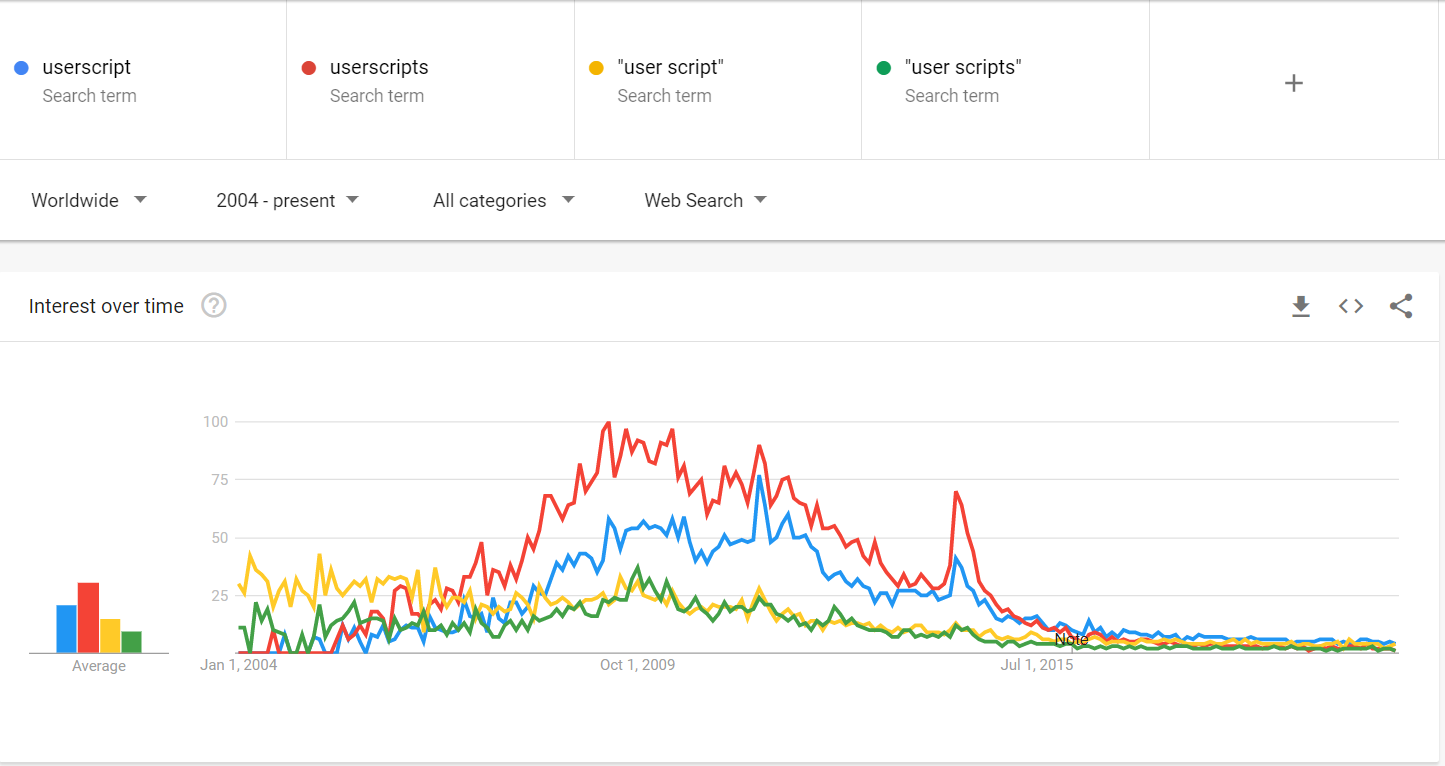
The growth of the user script community has stagnated over the past 10 years as official browser extensions have gained popularity instead.
After interviewing technical and non-technical people of whom some were aware of what user scripts are, I realized there are two core problems:
- User Aquisition: There are no easy to follow and understand explanations of what user scripts are and how to use them in a way that resonates with non technical users. To solve this I built an interactive tutorial that uses modern adult learning techniques, not something ever done in the user script community before.
- User Retention: To convince a user to try to learn, you have to provide obvious motivation as to why they would want to stay. To solve this, I built a collaborative filter recommendation system to provide relevant, personalized results.
User Aquisition - Interactive Tutorial
Current research into effective adult learning techniques encourage teachers to follow these four core principles:
- Keep the lesson concise.
- Let users practice what they are taught.
- Use rewards as motivation.
- Accommodate the three different learning styles: visual, auditory, and kinesthetic.
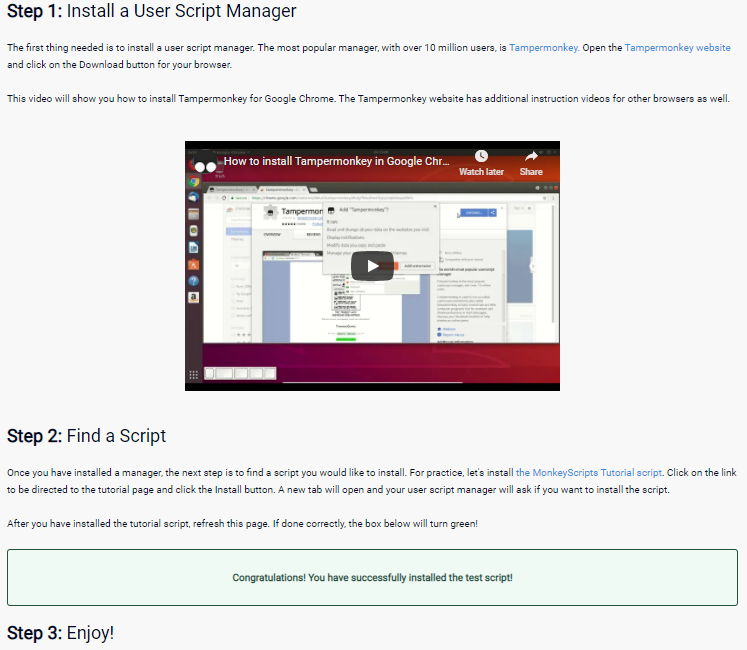
To teach users, I created a tutorial that accommodated each of the above. To keep things concise, I broke the system down into two steps: 1) Install a user script manager; 2) find and install a script. To accommodate different visual and auditory learning styles, I included a video explaining how to install a user script manager. Where my tutorial differs than others, is that I created a script that I instructed users to install. When this kinesthetic task is completed, users will be immediately rewarded in the tutorial itself by updating the site itself. Constant feedback from early testers found this easier to understand than traditional wall-of-text tutorials other sites provide. You can check out the live tutorial here.
User Retention - Content Discovery
New and existing users need to be provided a reason to continue learning and using any product. This is especially true with a niche and technical tool like user scripts. The best way to provide this motivation is by clearly showing users scripts that are relevant to them. Other user script hosting sites simply provide a list that can be sorted by top downloads or top rated, but often these are filled with complicated or irrelevant scripts. I believe that implementing a suggestion system, just like successful companies like Netflix and Amazon, would help users find things that are most relevant to them and convince them to stay.
I decided to use a similar type of recommendation system to the large companies: an item-based collaborative filtering recommendation system. This system records every user's interaction with scripts. If a user downloads a script, the interaction is rated higher than a simple visit to the description. The system will then compare every script with eachother and, based off of the users that interacted with both scripts, calculate a simularity score.
To calculate this score, I decided to use the Pearson Correlation, a common similarity comparison algorithm. It will take the previously mentioned interaction scores and provide a correlation value representing similarity between -1 and 1.
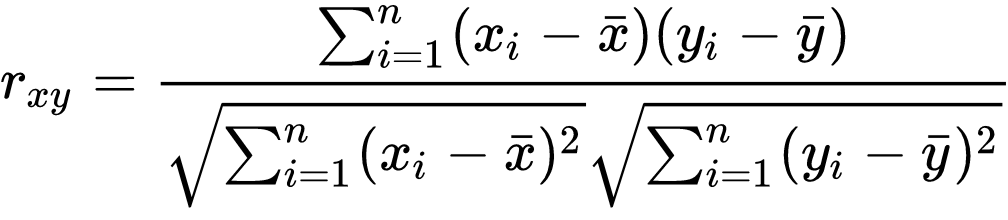
The correlation is than multiplied by combined interaction scores to provide a final similarity raiting.
When a user signs into MonkeyScripts, the website looks at their previously visited and downloaded scripts. From these, it will select several and generate suggestions based off of the scripts most similar to each one. These are then presented to the user as recommended scripts (with a little bit of randomness to keep things interesting).
To provide a simplified example of the result: Imagine Alice likes apples, bananas, and pears. Bob knows he likes apples and bananas. Since we know from Alice that people who like apples and bananas also like pears, we would suggest that Bob try a pear to see if he enjoys it as well. The more data points we have, the more accurate this system becomes.
Takeaway
- There is a lot more to making and promoting a new website than simply adding cool and modern features. SEO, advertising, content creation, etc takes different skills and a lot of time.
- Simply based off of the feedback received, this project proved to me that incorporating modern learning and content discovery techniques is a feasible method of lowering the bar of entry for niche and difficult-to-understand communities.